EventBookings allows you to generate and download a QR code for your event. You can use this QR code to easily share your event page with attendees through posters, flyers, emails, social media, or other promotional materials.
Steps to Generate and Download an Event QR Code
- Go to your Organization Dashboard.
- From the organisation’s menu, select Events.
- Open the event for which you want to download the QR code.
- Click the Share button in the top-right corner of the event page.
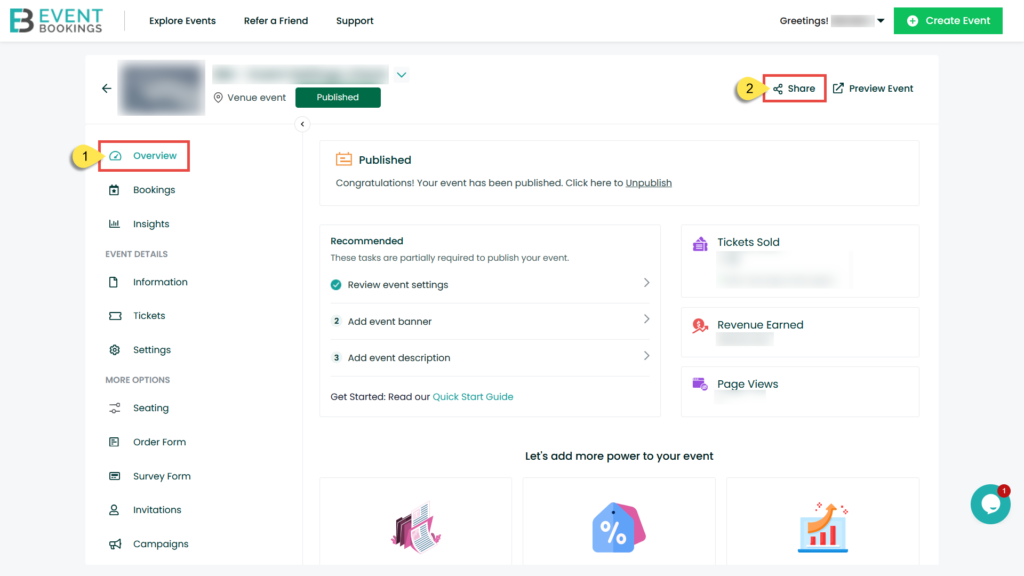
5. In the Share Event pop-up, click Download SVG.

6. The QR code will be downloaded as an SVG file.
You can now add the downloaded QR code to your event marketing materials or share it directly with your audience. When attendees scan the QR code, they will be taken to the event page.
Note
The downloaded SVG file is a high-quality format, making it suitable for both digital and printed materials.
Was this information helpful?
 Slovenia
  Australia
  United States
  United Kingdom
  New Zealand
  Canada
  Ireland
  Argentina
  Austria
  Bangladesh
  Belgium
  Brazil
  Bulgaria
  China
China  Croatia
  Cyprus
  Czech Republic
  Denmark
  Egypt
Egypt  Estonia
  Fiji
Fiji  Finland
  France
  Germany
  Gibraltar
  Greece
  Hong Kong
  Hungary
  India
India  Indonesia
  Italy
Italy  Japan
Japan  Jordan
  Latvia
  Liechtenstein
  Lithuania
  Malaysia
  Malta
Malta  Mexico
  Netherlands
  Norway
  Philippines
  Poland
  Portugal
  Qatar
Qatar  Romania
  Saudi Arabia
  Singapore
  Slovakia
  South Africa
  South Korea
  Spain
Spain  Sweden
  Switzerland
  Taiwan
  Thailand
  United Arab Emirates